

React Virtual Dom Impact

Initial Render Process in React
If you look at this diagram carefully
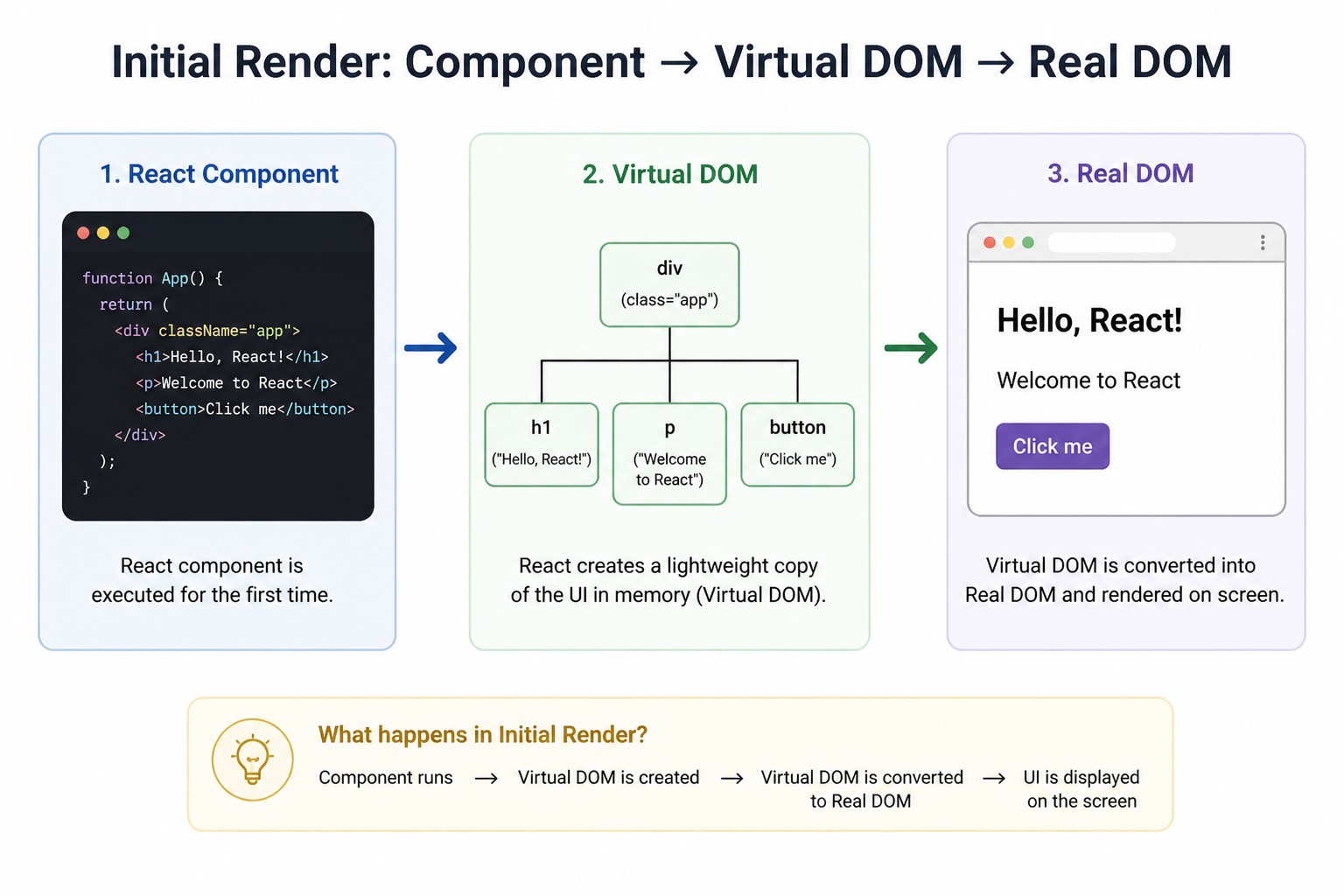
So here, it’s important to understand what React is doing.
Without the Virtual DOM, what is the problem?
Normally, what happens is:
Whenever there is even a small change in the UI,
for example a button click or a text update,
the browser directly updates the Real DOM.
What issue does this cause?
- Updating the Real DOM is very slow.
On every change :
Layout gets recalculated (reflow).
UI gets repainted.
If the app is large, performance goes down.
If we say it in simple words:
Even for a small change, the system does a lot of work.
What does React do?
1. The component runs
The React component gets executed.
2. Virtual DOM is created
It doesn’t directly update the Real DOM.
First, it creates a copy in memory.
This is called -
Virtual DOM (lightweight JS object)
3. It converts it into Real DOM
The final UI is displayed in the browser.
So, how was the problem solved?
The main point is :
React does not update the Real DOM again and again directly.
Instead:
First, it creates a Virtual DOM.
It compares the changes.
It updates only what has changed.
The real problem that got solved:
1. Unnecessary DOM Updates
Before:
On every change, the full DOM was updated.
Now:
Only the changed part is updated.
2. Slow Performance
Before:
Heavy browser work
Now:
Fast calculations in JavaScript
Minimal DOM updates
3. Complex UI Handling
Before:
Developers had to manage it manually
Now:
React handles it automatically
We can say that
The main job of the Virtual DOM is to avoid unnecessary and expensive DOM updates, and efficiently update only what has changed.
State Update Triggering New Virtual Dom Tree
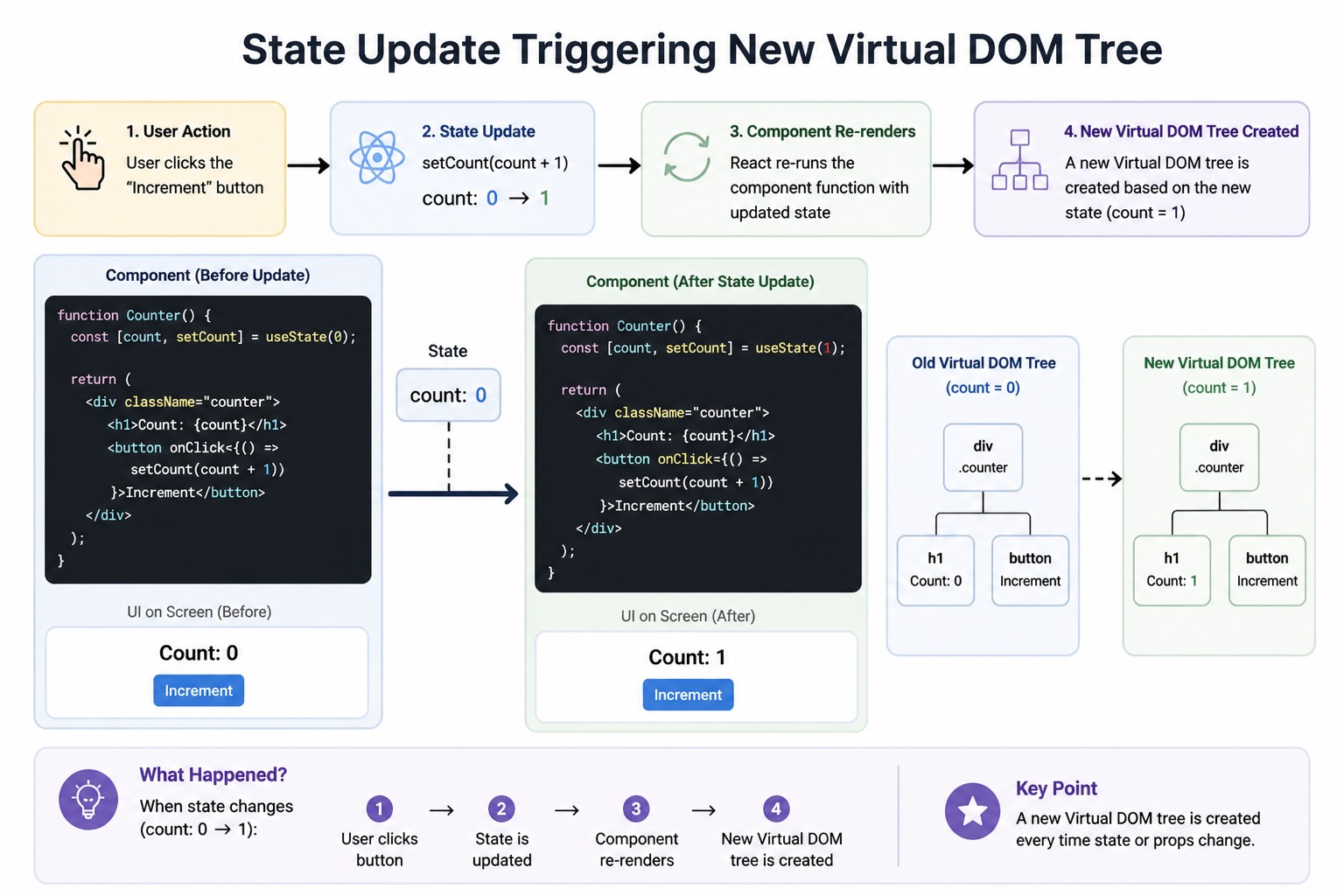
What is happening in this figure?
You click the button
The number changes (0 → 1)
But what React does internally… that is important.
Basic Level Understanding
1. User Action
You click the “Increment” button
That means
The user clicked the button…
2. State Update
setCount(count + 1)
The count changed from 0 to 1
That means
The state has changed… the count is now 1
3. Component Re-render
React runs the component again
The same function executes again
That means
React re-runs the component
4. New Virtual DOM Tree
React creates a new Virtual DOM
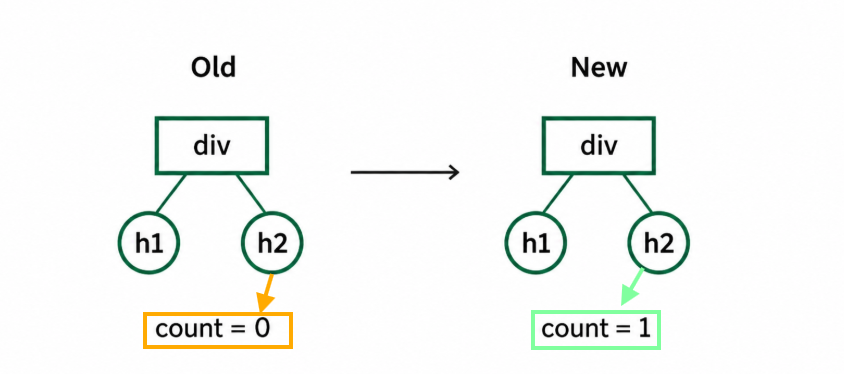
That means
React creates a new Virtual DOM with the updated state
Now the real understanding (important part)
Important point
On every state change, React creates a new Virtual DOM
Why is this necessary?
If React does not create a new Virtual DOM:
It wouldn’t be able to know what has changed
Hidden Step { Diffing }
Now what React does is:
It compares the old Virtual DOM with the new Virtual DOM
It finds out:
Only the count has changed
React bolta hai:
Just update this text
There is no need to re-render the entire page
The problem that is being solved
Without this process:
On every click, the full UI updates
Slow performance
With This Process:
Only the changed part is updated
Fast UI
Flow
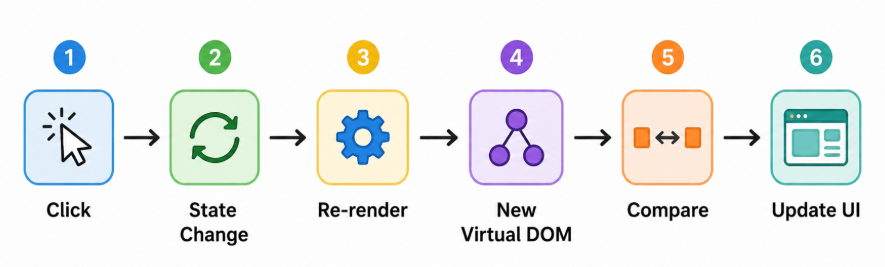
So we can say that
React creates a new Virtual DOM on every state change, so it can compare and update only what has actually changed.
Diffing ( reconciliation )
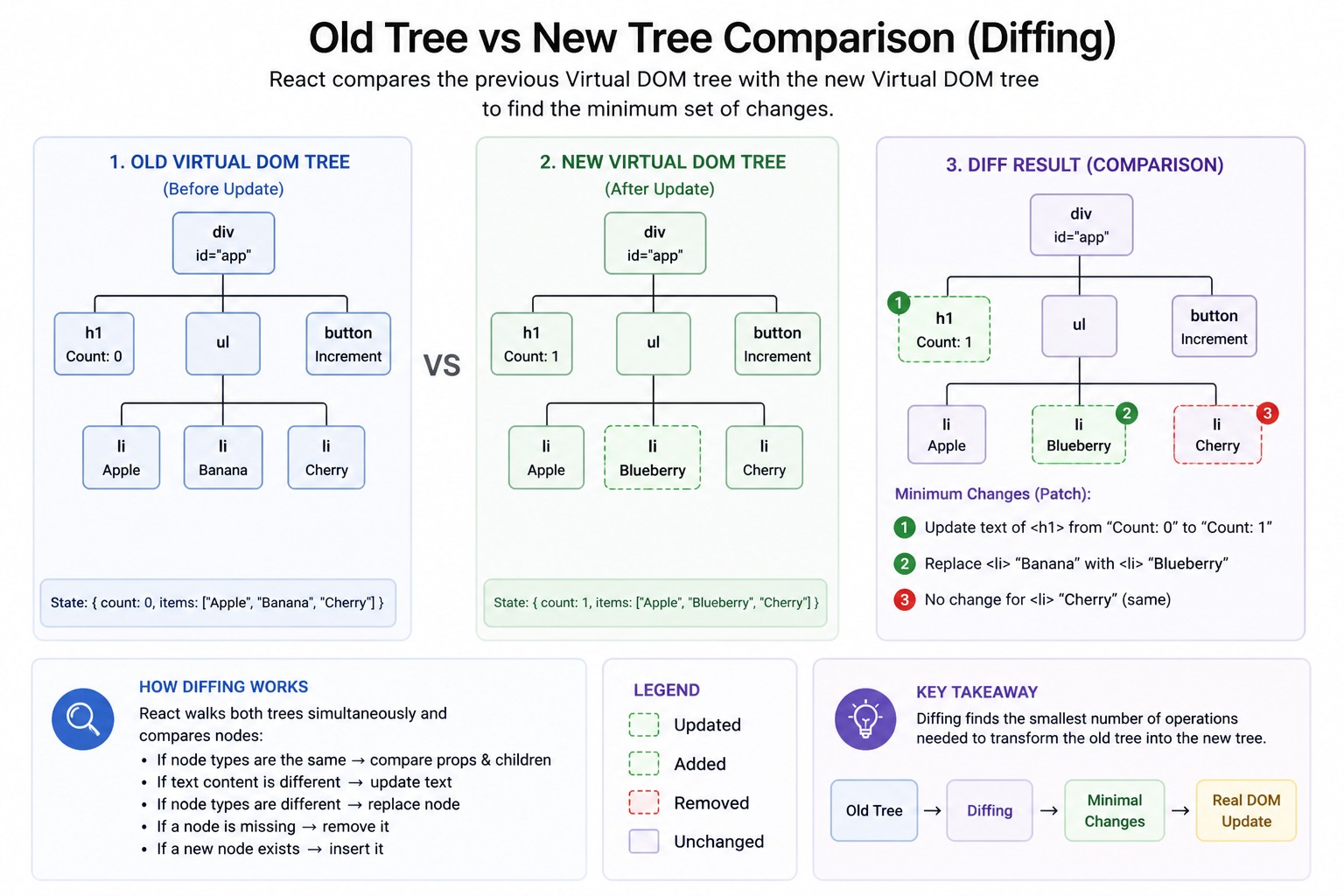
As you can see in this diagram
Two trees are visible
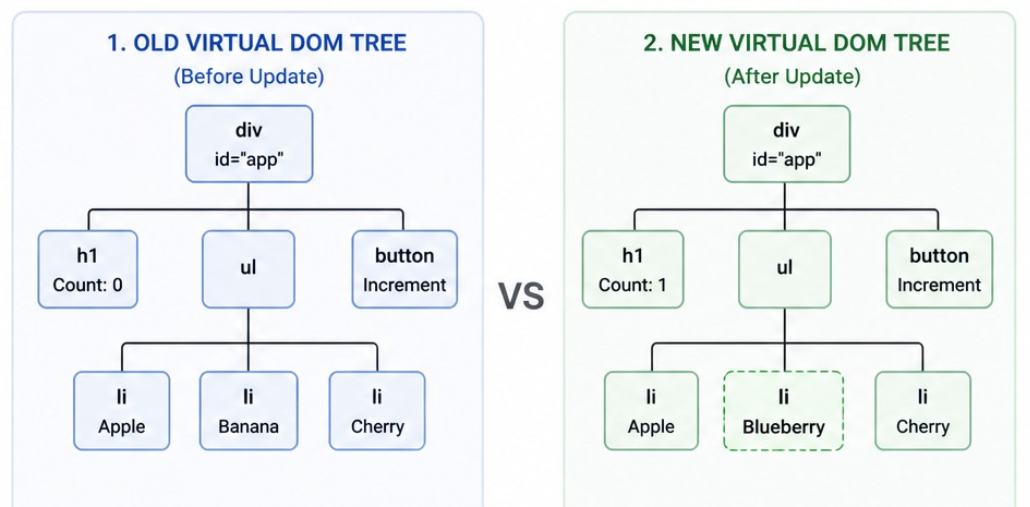
React is comparing both of them.
Simply we can say that
“React is checking what was there before and what has changed now.”
1. Old Virtual DOM (Before Update)
Here
Count = 0
List: Apple, Banana, Cherry
That means
This is the old UI… where the count is 0 and the list contains Banana.
New Virtual DOM (After Update)
Here
Count = 1
List: Apple, Blueberry, Cherry
That means
After the state changes, a new Virtual DOM is created where the count becomes 1 and Blueberry replaces Banana.
React did not rebuild the entire UI again
It only created a new Virtual DOM tree
Comparison ( Diffing )
What does React do?
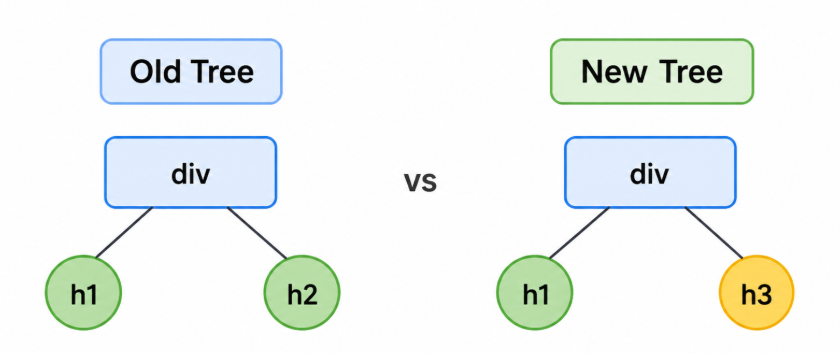
It compares node by node
What does React detect?
First change:
Count: 0 → 1
Only the text has changed
Second change
Banana → Blueberry
One list item is replaced
Cherry is the same, no change happened here
Minimal Changes (Patch)
React says:
Update the h1 text
Replace Banana
Do not touch Cherry
React applies only these 2 changes to the Real DOM
It does not rebuild the entire DOM again
This solves the problem:
Without diffing
On every update, the full DOM changes
Because of this, performance is slow
With diffing
Only the required changes are made
Because of this, the UI becomes fast
Concept
The job of diffing is to compare the old and new Virtual DOM and find only the minimum changes.
Flow
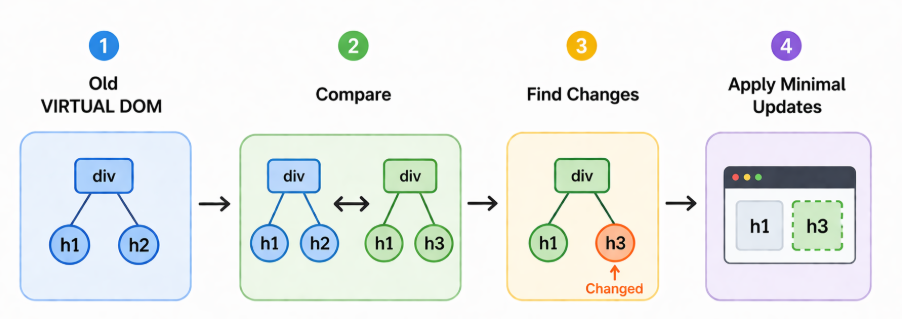
React does not update the whole UI. It only updates the parts that actually changed. This process is called diffing.
Minimal Update Patch Applied to Real DOM
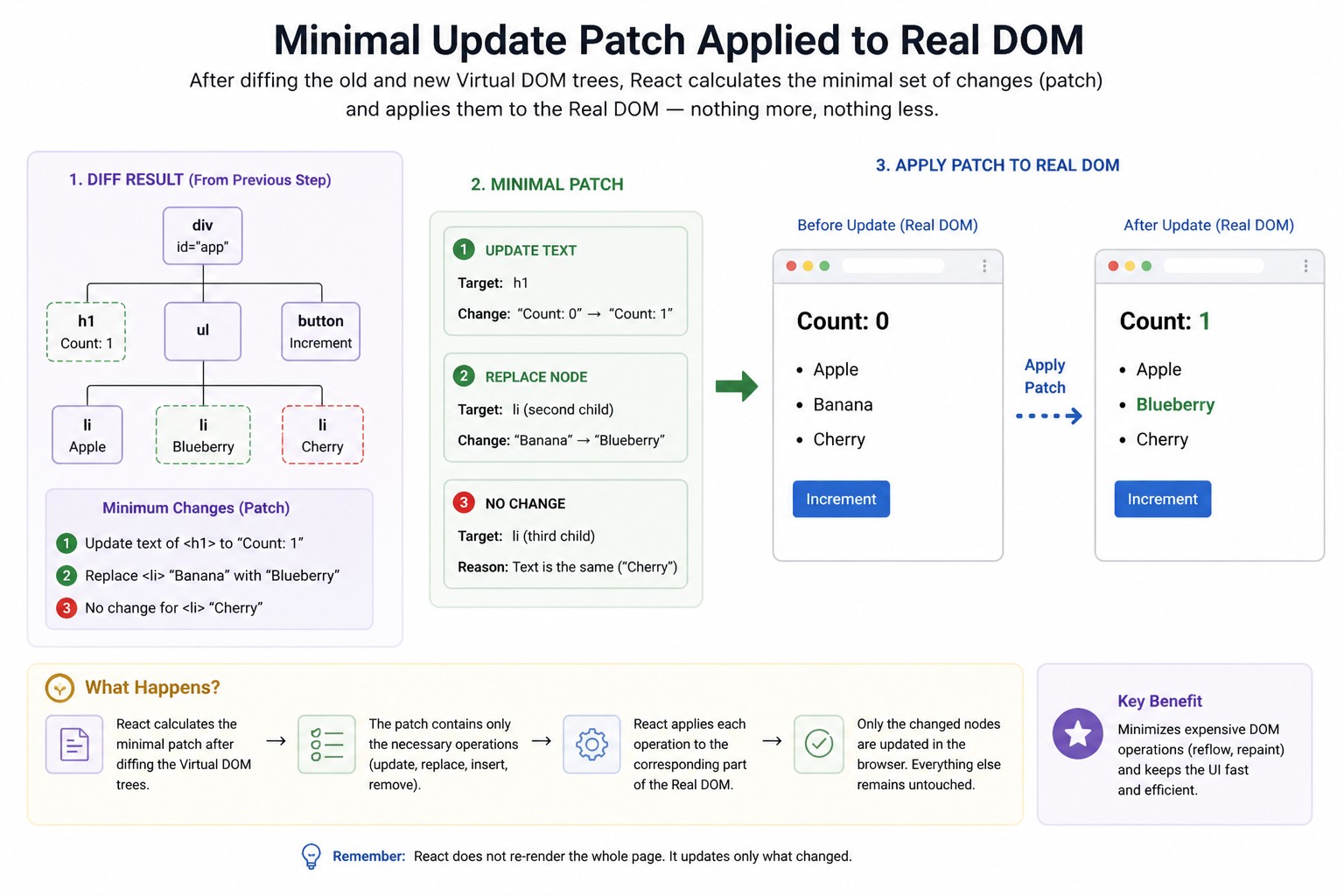
In this fig.
Why is React fast?
Because it doesn’t update the whole page…
it only changes what has actually changed.
But how does it decide that?
Today, we’ll understand the concept of ‘Minimal Patch.
1. From the DIFF RESULT
First, React compares the old Virtual DOM with the new Virtual DOM.
Then it finds exactly what has changed.
Example:
Count: 0 → 1
‘Banana’ → ‘Blueberry’
‘Cherry’ stays the same.”
2. MINIMAL PATCH
Now React creates a list of changes — this is called a ‘patch’.
Only the necessary changes are included:
Update the h1 text (Count 0 → 1)
Replace ‘Banana’ with ‘Blueberry’
Do not touch ‘Cherry’ (no change)
This is called a ‘minimal patch
3. APPLY PATCH TO REAL DOM
What does React do next?
It applies this patch directly to the Real DOM.
Only the parts that changed are updated,
and everything else stays the same.
Visual Explanation -
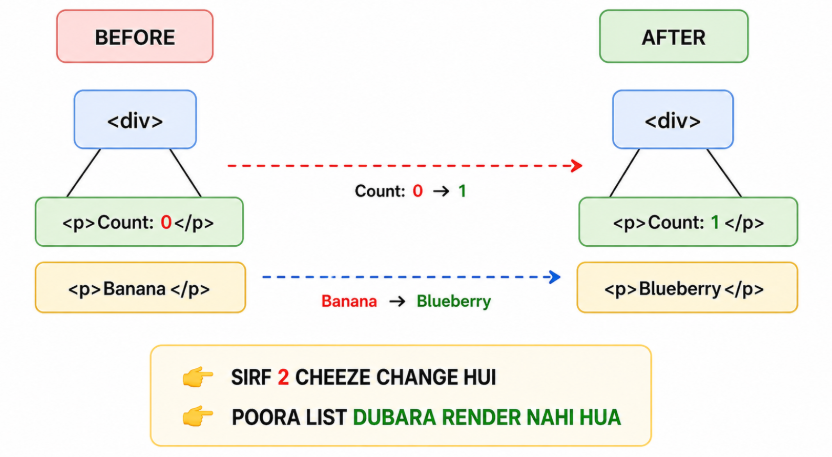
WHY THIS MATTERS -
Performance becomes faster
The load on the browser is reduced
The UI stays smooth
And that’s why React is faster than the traditional DOM.
Remember This -
React does not update the entire DOM.
It only applies minimal changes.
React Update Lifecycle
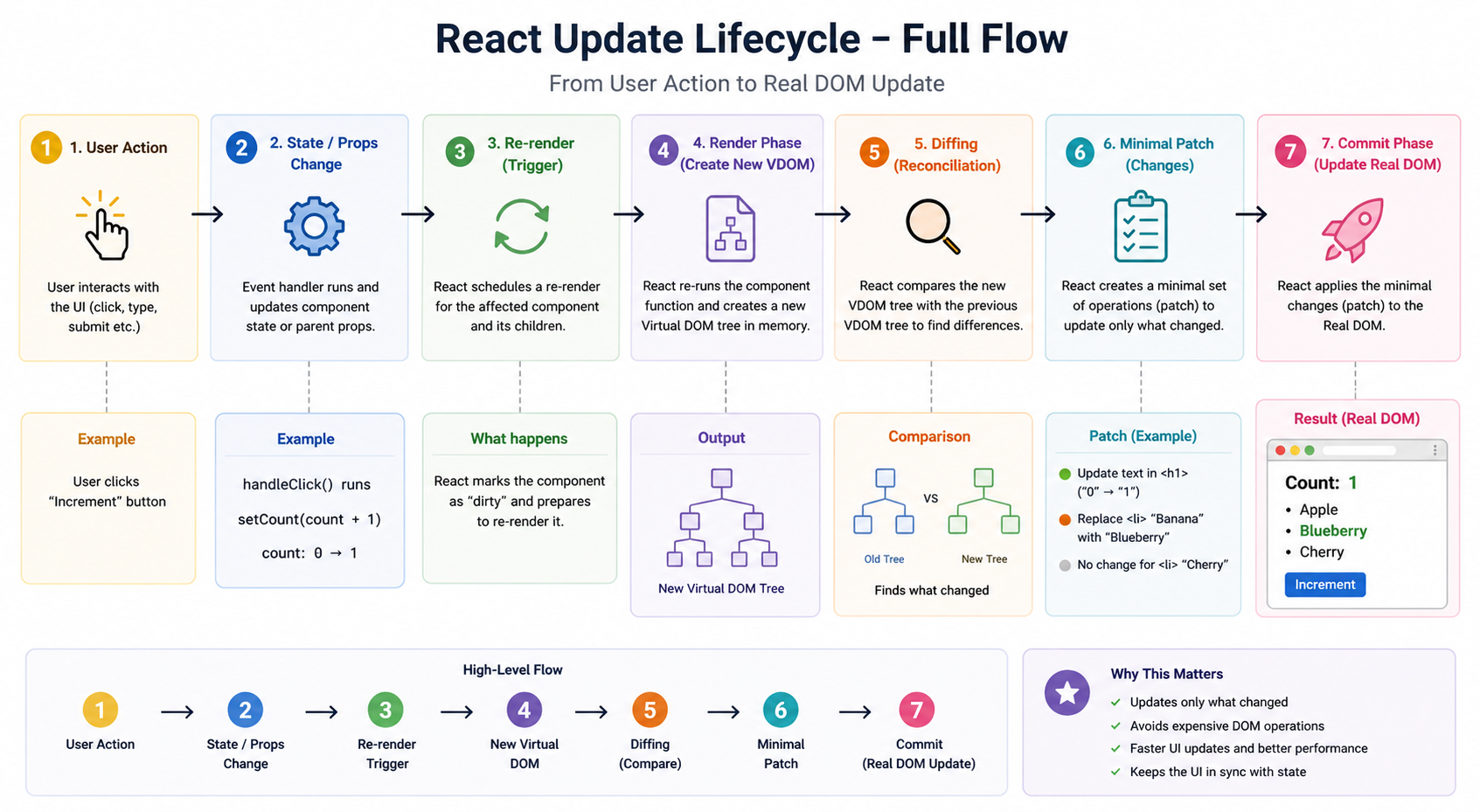
Why is React so fast ?
When we make changes in the UI, the whole page does not reload... only the parts that changed get updated.
But how does it work internally ?
Now, we will understand React's update lifecycle step by step.
User Action
Everything starts with a user action.
For Example, when a user clicks a button — like the 'Increment' Button.
State / Props Change
When the user clicks, a function runs — like handleClickFn().
That function updates the state.
For example, count changes from 0 to 1.
Re-Render Trigger
Now React detects that the state has changed.
It marks the component as dirty.
And says - 'this needs to be re-render.'
New Virtual DOM
Now, what does React do next?
It runs the component function again.
And creates a new Virtual DOM in memory.
This is not the actual DOM - it's a lightweight copy.
Diffing ( Reconciliation )
React compares two versions of its virtual layout
old Virtual DOM
new Virtual DOM
Then it checks
- what exactly has changed between them.
Minimal Patch
React creates a list of changes
- React updates only the part that has changed.
Example -
If the text changes from 0 to 1,
React will update only that specific text, not the whole page.
Overall flow
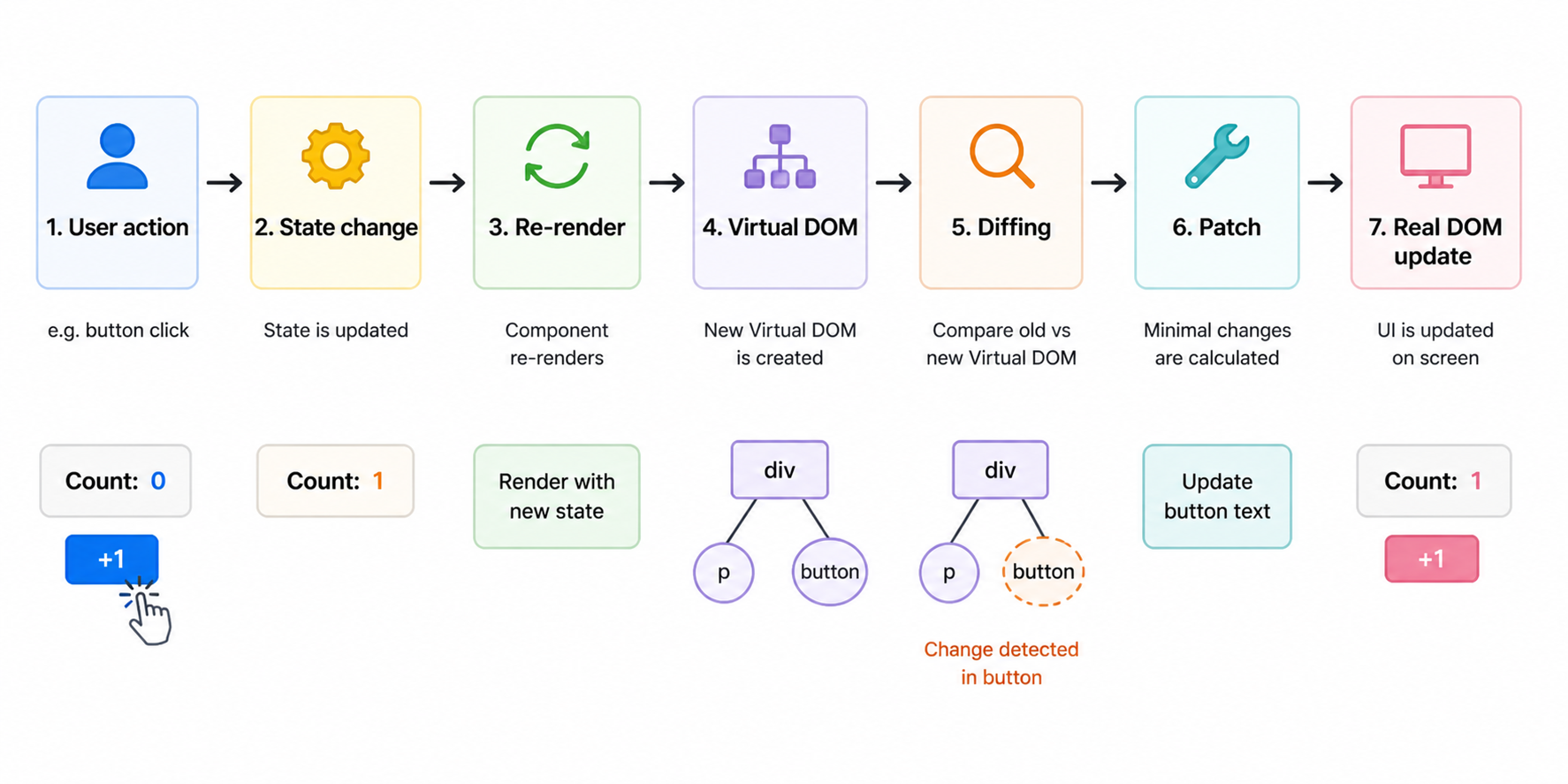
Real DOM Update
Finally, React applies these changes.
- Only a small, necessary update is made in the Real DOM.
That is why React is fast - it doesn't reload the entire page.
Conclusion :
React works in a smart way - it only updates the parts that change, not the whole page
connect with me, click on 👇

I'd love it if you could check out my blog and share your thoughts.
Let me know what you liked & what I can Improve.
Don't forget to drop a comment - it really helps me grow!


